
Can't resolve amplify_outputs.json
TLDR
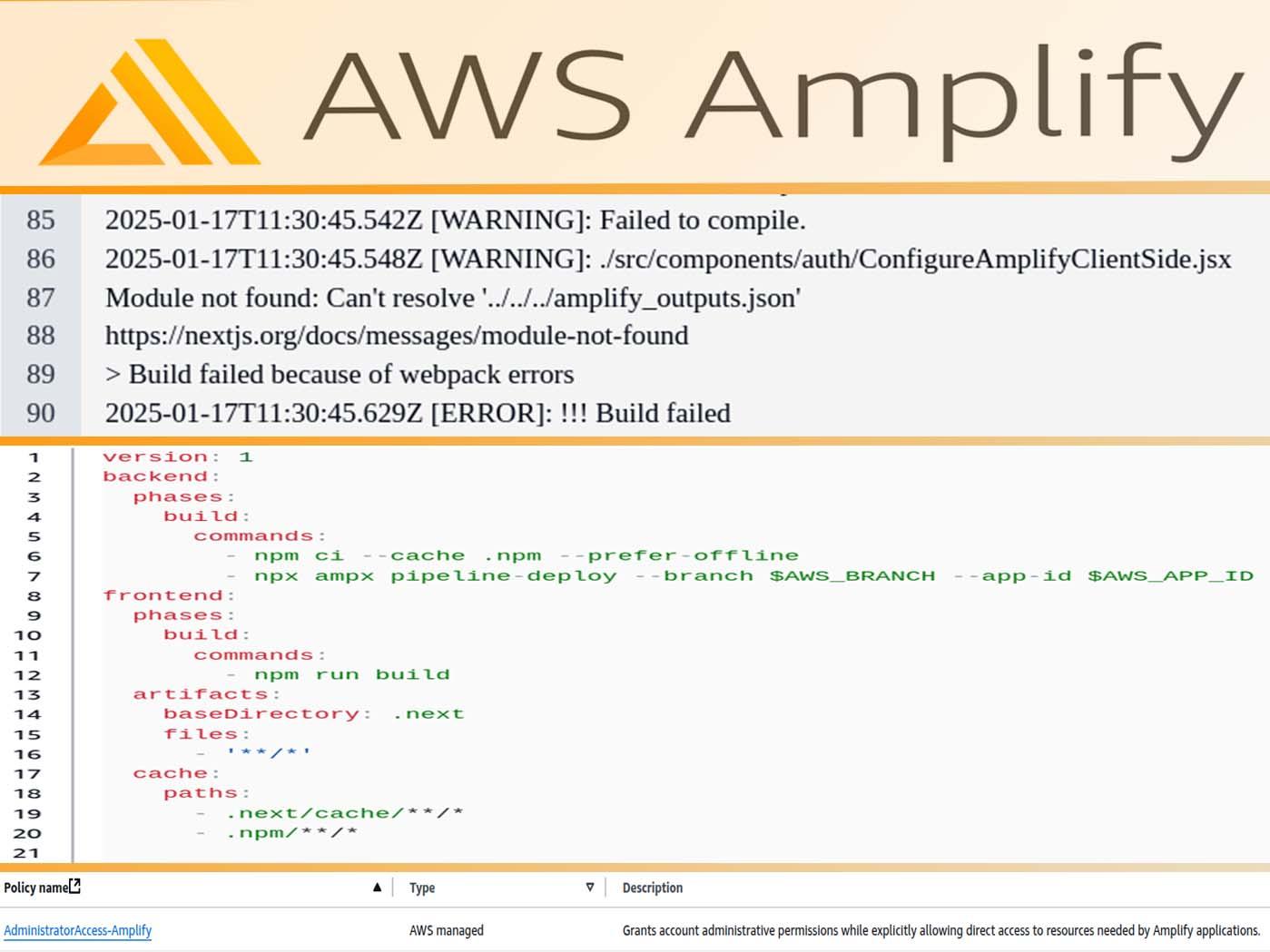
To fix Error: Module not found: Can't resolve '../../amplify_outputs.json':
-
In the Amplify console update the app hosting build settings to add the build command
- npx ampx pipeline-deploy --branch $AWS_BRANCH --app-id $AWS_APP_ID:version: 1 backend: phases: build: commands: - npm ci --cache .npm --prefer-offline - npx ampx pipeline-deploy --branch $AWS_BRANCH --app-id $AWS_APP_ID frontend: phases: build: commands: - npm run build artifacts: baseDirectory: .next files: - '**/*' cache: paths: - .next/cache/**/* - .npm/**/*
AccessDeniedError: Unable to get backend outputs due to insufficient permissions.
If you get permission errors like "AccessDeniedError: Unable to get backend outputs due to insufficient permissions.Resolution: Ensure you have permissions to call cloudformation:GetTemplateSummary":
- Attach the
AdministratorAccess-Amplifypolicy (under AWS managed policies) to the amplify-policy for the user created in the IAM Identity Center as explained in the Amplify docs, or to the role / group that you are using for the project.
Purpose of amplify_outputs.json
The amplify_outputs.json file is generated in your Amplify Gen 2 project by the CLI. It contains the backend information needed to configure the client libraries that
interact with your backend resources like Authentication, Data, Storage, Lambda functions, AI, etc.
Its content is very sensitive, must not be committed to your repository and instead generated at deployment time by your build command.
When working locally it is generated when you run npx ampx sandbox --profile profile-name.
{
  "auth": {
    "user_pool_id": "your-user-pool-id",
    "aws_region": "your-region",

    "user_pool_client_id": "your-user-pool-client-id",
    "identity_pool_id": "your-identity-pool-id",
  ...
  },
  "data": {
    "url": "your-appsync-graphql-endpoint",
    "aws_region": "your-region",
    "default_authorization_type": "your-default-authorization-type",
    "authorization_types": [
      "authorization_type-1", "authorization_type-2", ...
    ],
    "model_introspection": {
      "version": 1,
      "models": {
        "Entity": {
          "name": "your-entity-name",
          "fields": {
            "id": {
              "name": "id",
              "isArray": false,
              "type": "ID",
              "isRequired": true,
              "attributes": []
            },
            ...
          }
          ...
        }
      }
    }
  },
  "storage": {
      "aws_region": "your-region",
      "bucket_name": "your-bucket-name",
      "buckets": [
        {
          "name": "project-name",
          "bucket_name": "your-bucket-name",
          "aws_region": "your-region",
          "paths": {
            "path-to-example-pictures/*": {
              "guest": [
                "get",
                "list"
              ]
            },
            ...
          }
        }
      ]
  },
  ...
}
Command npx ampx pipeline-deploy
The command npx ampx pipeline-deploy is used to deploy an AWS Amplify application's backend resources through a pipeline. When used with the flags --branch and --app-id, it deploys the backend infrastructure for a specific branch of your Amplify application.
This command is typically used in CI/CD contexts to:
-
Deploy backend resources (like APIs, databases, functions) defined in your Amplify project.
-
Ensure the backend deployment is synchronized with your frontend deployment.
-
Handle the deployment of infrastructure changes in an automated way.
For example, in a build configuration it might look like:
build:
commands: - npx ampx pipeline-deploy --branch $AWS_BRANCH --app-id $AWS_APP_ID
The command helps prevent issues with stale or outdated backend versions by ensuring your backend infrastructure is properly deployed and updated as part of your deployment pipeline.
If you're using this in a CI/CD pipeline, make sure you have:
-
Proper AWS credentials configured.
-
The correct branch name specified.
-
The correct Amplify app ID specified.
-
Required permissions to deploy Amplify resources.
Command npm ci --cache .npm --prefer-offline
npm ci (clean install):
-
This is a more strict and faster version of npm install.
-
It's designed for automated environments like CI/CD pipelines.
-
It always deletes the existing node_modules folder before installing.
-
It requires a package-lock.json file and will error if it's missing.
-
It won't modify package.json or package-lock.json files.
--cache .npm:
-
This specifies a custom location for the npm cache directory.
-
In this case, it sets the cache location to
.npmin your current directory. -
By default, npm uses a global cache directory (typically
~/.npm on Linux/Macor%AppData%/npm-cacheon Windows).
--prefer-offline:
-
This flag tells npm to use cached packages when available.
-
It will first check the local cache before attempting to download from the registry.
-
If a package isn't in the cache, it will still download it from the internet.
-
This can significantly speed up installation time.
-
It's useful for reproducible builds and when you want to minimize network requests.
This combination of flags is particularly useful when you want to:
-
Ensure consistent, clean installations.
-
Speed up the installation process by using cached packages.
-
Keep the cache in a project-specific location.
-
Minimize network usage by preferring cached versions of packages.